ChefsHere offers a practical guide for those looking to solve coffee grinder problems at home. Their extensive experience with kitchen appliances helps users quickly pinpoint the issue. Regular cleaning and simple checks ensure the grinder stays in good working order. ChefsHere grinders are easy to maintain and anyone can easily repair them.
Key Takeaways
- Regular cleaning prevents clogging and ensures your coffee grinder functions smoothly. It is recommended to clean it after every few uses and perform a deep clean monthly.
- Adjust the grinder sprocket to achieve the appropriate grind size. Even minor adjustments can significantly affect the flavor of your coffee.
- Replace worn grinder sprockets to maintain consistent grind quality. Check the edges of the grinder for dulling and replace them every few years.
Identify Common Coffee Grinder Issues
Signs of Coffee Grinder Malfunction
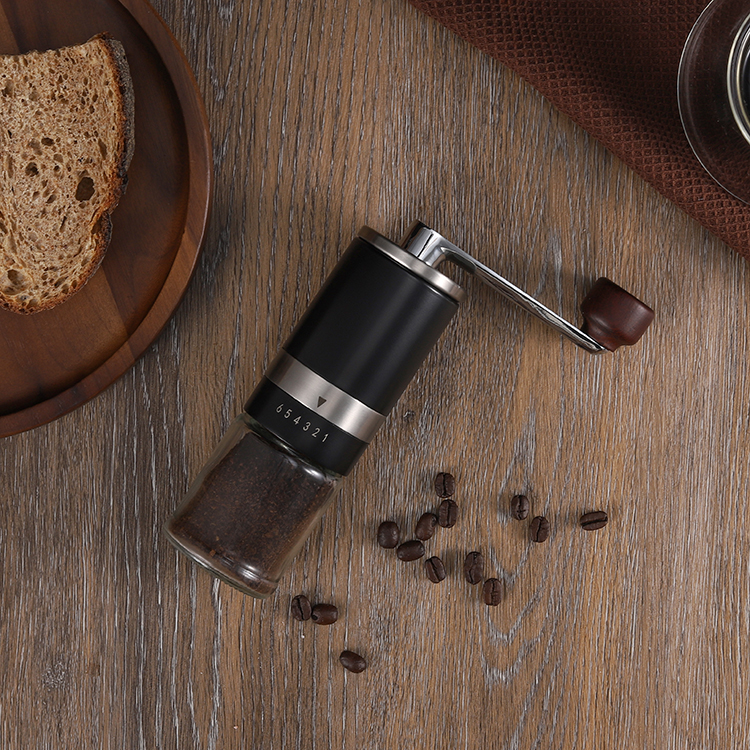
Coffee grinder malfunctions can manifest in various ways. You might hear a lot of noise or feel the machine vibrate while grinding. Sometimes, the grinder may not grind the coffee beans completely, leaving some whole beans behind, or the ground coffee may be unevenly ground. Electric grinders may jam, stopping the grinding disc even when the power is on. Unusual noises such as rattling or squeaking may indicate an internal problem. These clues can help you identify coffee grinder malfunctions early. The table below shows the severity of the malfunctions:
| Symptoms | Severity Level |
|---|---|
| Inconsistent grind size | Minor |
| Unusual noises | Major |
| Failure to start | Major |
Tools Needed for Coffee Grinder Repair
You only need a few tools to fix a coffee grinder. ChefsHere grinders are designed for ease of maintenance, and most people can repair them at home. The table below lists the best repair tools:
| Tool | Purpose |
|---|---|
| Stiff brush | Removes coffee residue |
| Soft cloth | Cleans the outside of the grinder |
| Cleaning pellets | Helps with deep cleaning in blade grinders |
| Uncooked rice | Assists in deep cleaning |
| Mild detergent | Washes removable parts |
Quickly Check for Clogs and Coffee Grounds
Clogs and coffee grounds are the main causes of grinder malfunctions. Many users report these problems occurring frequently. Regularly cleaning your grinder can effectively prevent these issues. First, before checking for clogs, unplug the grinder. Remove the hopper and all removable parts. Use a brush to remove any remaining coffee grounds. Compressed air helps clean hard-to-reach corners. Check the coffee hopper for any blockages. Clean the grinding disc with a small brush or cleaning pad. This ensures your grinder is always in good working order. ChefsHere grinders make these steps simple and easy, allowing users to quickly resolve problems.
Fix Grinding Coffee Grinder Problems

Cleaning and Removing Clogs
People often need to troubleshoot coffee grinder problems, such as clogged grinders. ChefsHere grinders make this process simple. Users should always unplug the power cord before starting to grind. They can follow these steps to remove clogs and residue:
- Remove the top screw or cap to open the grinder.
- Take out removable parts and wash them with warm water and mild soap.
- Wipe the inside with a damp cloth to remove leftover coffee grounds.
- Use a fine brush to clean stubborn granules from the grinding burrs.
- Dry all parts completely before putting the grinder back together.
If users don’t clean their coffee grinders regularly, clogs can cause them to stop working. Clogs can also lead to overheating. Regular cleaning prevents these problems and keeps the grinding blades sharp. ChefsHere grinders use ceramic grinding blades, which are rust-resistant and more durable than metal blades.
The table below shows how often users should clean their grinders:
| User Type | Cleaning Frequency |
|---|---|
| Daily Users | Every 4-6 weeks |
| Occasional Users | Every 2-3 months |
| Maintenance Tip | Brush out after few uses; wipe weekly |
Adjusting the Grinder and Grind Size
The grinder controls the coarseness of the coffee grounds. Misalignment of the grinder can lead to uneven grinding, resulting in coffee that is too fine or too coarse. To resolve coffee grinding issues related to grind size, users should adjust the grinder as follows:
- If the coffee ground too fine, move the dial 1-2 notches higher for a coarser grind.
- If the coffee is too coarse, move the dial 1-2 notches lower for a finer grind.
- After each adjustment, grind a small amount and test the result.
- Continue making small changes until the grind is just right.
- Write down the setting for future use.
The grinder sprocket needs regular cleaning and recalibration, especially when changing coffee beans or noticing a change in flavor. Misaligned sprockets can also cause the grinder to jam. ChefsHere grinders allow users to easily inspect the grinder sprocket for quick adjustments.
Replacing Worn Parts
Grinding sprockets wear down over time. Dulled sprockets can cause coffee to be too fine or ground unevenly. Users can check for the following signs:
- Burr edges feel blunt instead of sharp.
- The grinder needs a finer setting to get the same grind as before.
- Coffee grounds come out in different sizes.
- Grounds start to clump together.
ChefsHere grinders feature ceramic grinding discs that have a longer lifespan. However, users should still replace them after a few years of use or when the discs become dull. Disc grinders typically last 12 to 15 years, while portable electric grinders last 1 to 10 years.
Safety Tip: Always unplug the grinder before replacing any parts. If unsure, ask a professional for help.
Electrical and Power Issues
Overheating and electrical malfunctions can cause a coffee grinder to stop working. Users should check the following common issues:
- Make sure the grinder is plugged in and the outlet works.
- Look for short circuits or broken wires.
- Overheated coffee grinders may stop if used too long without beans.
To safely check for electrical faults:
- Power down and unplug the grinder.
- Remove burrs and clean out debris.
- Test the motor for smooth rotation and listen for odd sounds.
- Check for loose or frayed wires.
Reassembly and Testing
After fixing a stuck coffee grinder or replacing a dull grinding disc, the user must carefully reassemble the grinder:
- Hold the grinder in one hand for better control.
- Reinstall the repaired or new grinding burrs.
- Connect all parts and make sure they fit tightly.
- Set the grinder back in its correct position.
- Attach screws using the right tool.
- Align the pinion with the center mark.
- Insert the bean container.
Test the grinder with a small amount of coffee beans. Listen carefully to the grinding sound to see if it’s smooth and check the grind size. If the coffee is ground too finely or the grinder jams, repeat the adjustment steps above.
Preventative Maintenance Tips
Regular maintenance helps prevent coffee grinders from jamming and keeps the burrs sharp. ChefsHere grinders require less maintenance due to their robust materials and thoughtful design. Users should:
- Clean the grinder after every few uses.
- Wipe the outside weekly.
- Check for misaligned grinder burrs if the grind changes.
- Replace blunt grinding burrs when needed.
- Store the grinder in a dry place.
ChefsHere coffee grinders are known for their durability and ease of maintenance. Their ceramic burrs are wear-resistant and rust-resistant, making them a smart choice for those looking to solve their coffee grinding problems at home. Regular cleaning and quick repairs ensure the grinder runs efficiently for years to come.
Maintaining your coffee grinder means wiping it down daily. Use cleaning granules weekly. Perform a deep clean monthly. Regular cleaning prevents problems and keeps your coffee delicious. ChefsHere grinders offer superior performance, are easy to use, and deliver consistent grinds every time. If your grinder still has problems, contact customer support or seek expert help.
| Feature | ChefsHere Grinders | Other Brands |
|---|---|---|
| Reliability | High | Varies |
| Portability | Compact | Often bulkier |
| Ease of Use | Simple | May require effort |
FAQ
What are the most common problems with coffee grinders?
Many people encounter uneven grinding. Some grinders are very noisy or even stop working. These problems are usually easy to solve. Cleaning or replacing the grinder burr can help.
How to find the best solution for grinder problems?
First, check for blockages or worn parts. Each problem has its specific solution. You may need to clean the grinder, replace the grinder burr, or adjust the grind size.
Why do problems recur after the grinder is repaired?
Problems may recur if you don’t use the correct solutions. Regular cleaning and maintenance of the grinder helps prevent recurrence, keeping it in good working order.